How to Use AI to See New Paint Colors on Your Walls Before You Buy a Brush


Have you ever stood in the middle of your living room with ten different paint swatches taped to the wall? I have been there many times. As a professional interior designer, I can tell you that choosing the right wall color is one of the hardest parts of a home makeover.
In the past, we had to rely on tiny paper samples or expensive sample pots. Even then, a color that looks great in the store can look completely different in your home. This is because of lighting, shadows, and the furniture you already own.
The good news is that technology has changed everything. Today, we use Artificial Intelligence (AI) to take the guesswork out of painting. You can now see exactly how a shade of “Midnight Blue” or “Soft Terracotta” will look on your specific walls before you ever open a can of paint.
In this guide, I will show you how to use AI tools to visualize your home renovation. Whether you are doing it yourself or hiring experts for interior design in kolkata, these digital tools will save you time, money, and stress.
Why Should You Use AI Before Painting Your Home?
Before we dive into the “how,” let us look at the “why.” Traditional methods of choosing paint are often flawed.
Avoid Expensive Mistakes
Paint is not cheap. If you buy three gallons of premium silk-finish paint and realize you hate the color after the first coat, that is a lot of money down the drain. AI lets you “test drive” the color for free.
See the Room as a Whole
A small swatch does not show you how the color interacts with your flooring, your sofa, or the sunlight coming through your window. AI visualization tools process the entire image of your room. They apply the color around your furniture and decor so you get a realistic view of the finished project.




Compare Multiple Options Fast
Instead of waiting for paint to dry, you can switch between twenty different shades in twenty seconds. This helps you narrow down your choices from “maybe” to “definitely.”
The Best AI Tools to Visualize Paint Colors
You do not need to be a tech expert to use these tools. Most of them are available as free apps on your smartphone or as web tools on your computer.
1. Brand-Specific Visualizer Apps
Major paint brands like Sherwin-Williams, Benjamin Moore, and Asian Paints have created their own AI-powered apps.
- How they work: You take a photo of your room. The app uses an AI “masking” technique to identify where the walls are. You then tap a color from their catalog, and the wall changes color instantly.
- Pro Tip: These are best if you already know which brand of paint you want to buy.
2. Generative AI Interior Design Tools
Tools like ReimagineHome or Interior AI are more advanced. They do not just change the color; they can suggest a whole new style for your room.
- How they work: You upload a photo, and the AI suggests colors based on the “mood” you want, such as “Modern Minimalist” or “Cozy Farmhouse.”
Step-by-Step Guide: How to Use AI to Re-Color Your Walls
If you are ready to start your home improvement journey, follow these simple steps to get the most accurate results from AI.
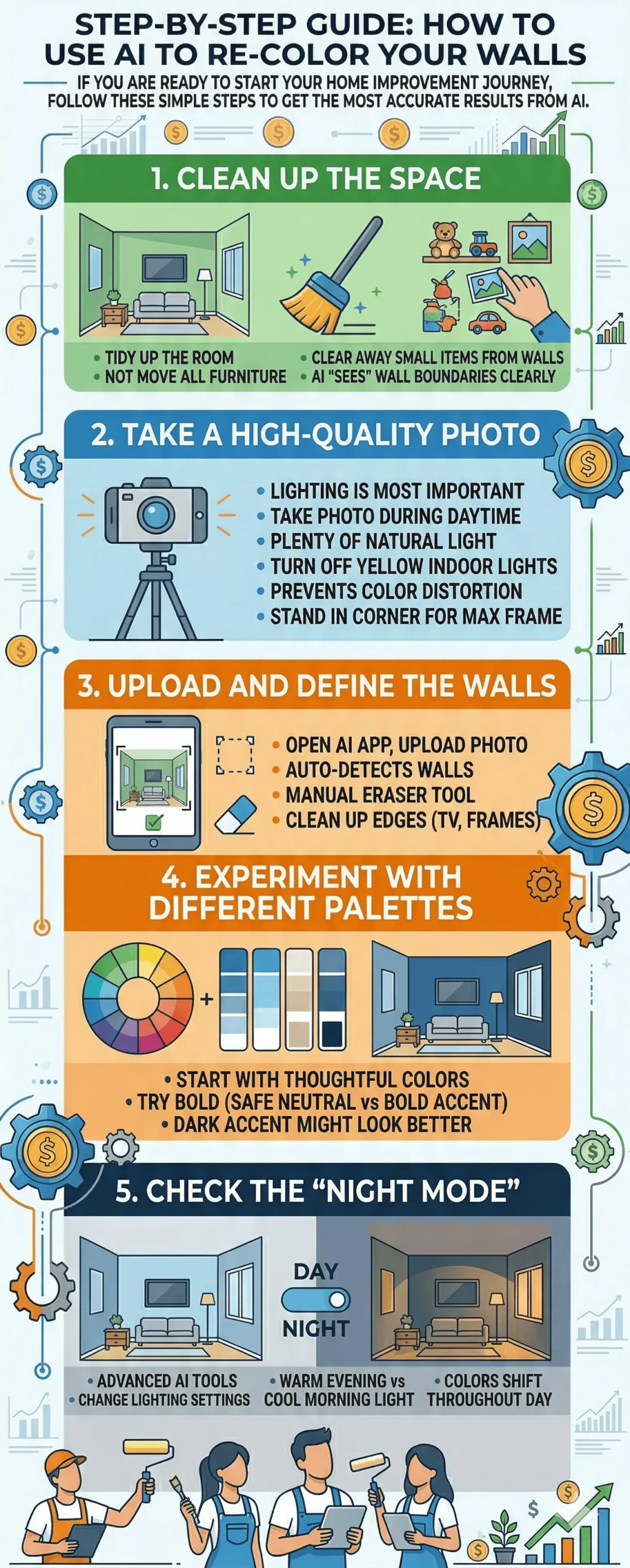
Step 1: Clean Up the Space
Before taking a photo, tidy up the room. You do not need to move all the furniture, but clear away small items from the walls. This helps the AI “see” the boundaries of the wall more clearly.
Step 2: Take a High-Quality Photo
Lighting is the most important factor here. Take your photo during the day when there is plenty of natural light. Turn off your indoor yellow lights as they can distort how the AI renders the digital paint. Stand in a corner to get as much of the room in the frame as possible.
Step 3: Upload and Define the Walls
Open your chosen AI app and upload the photo. Most modern apps will automatically detect the walls. If the AI accidentally “paints” over your TV or a picture frame, use the manual “eraser” tool in the app to clean up the edges.
Step 4: Experiment with Different Palettes
Start with the colors you think you want. Then, try something bold that you would normally be afraid to try. You might find that a dark accent wall looks much better than a safe neutral tone.
Step 5: Check the “Night Mode”
Some advanced AI tools allow you to change the lighting settings. See how the color looks in “warm” evening light versus “cool” morning light. This is a crucial step because colors shift throughout the day.
Understanding Lighting and Digital Accuracy
While AI is amazing, it is important to remember that a digital screen and real-world paint are different. A phone screen uses light to create color (RGB), while paint uses physical pigments.
To get the best results, always look at your AI designs on a high-brightness screen. Once you find a color you love in the app, I still recommend getting a physical tester for that one specific shade. The AI helps you skip the 50 colors you don’t want so you can focus on the one you do.
If you feel overwhelmed by these digital choices, consulting a professional can help. Expert firms specializing in interior design in kolkata often use professional-grade AI software to give clients a 100% accurate 3D preview of their homes.
LSI Keywords and Modern Design Trends
When using AI to plan your room, keep these modern interior design terms in mind. They can help you search for the right “vibes” within the AI apps:
- Biophilic Design: Using earthy greens and browns to bring nature indoors.
- Monochromatic Schemes: Using different shades of the same color for a sophisticated look.
- Accent Walls: Painting just one wall a bold color to create a focal point.
- Muted Tones: Soft, grey-based colors that create a calming environment.
- Satin vs. Matte Finish: Some AI tools can even simulate the “sheen” of the paint.
Common Mistakes to Avoid When Using AI Paint Tools
- Ignoring the Floor: Many people forget that the floor reflects color onto the walls. If you have a bright red rug, it will change how a white wall looks. Make sure your AI photo includes your flooring.
- Low-Resolution Photos: If your photo is blurry, the AI cannot find the edges of the wall. This leads to “bleeding” where the color spills onto your ceiling or furniture.
- Over-Editing: Do not put a filter on your photo before uploading it. The AI needs the raw, natural colors of your room to give an accurate prediction.
Conclusion: The Future of Home Design
We are living in an era where technology makes home decoration accessible to everyone. Using AI to see new paint colors is no longer a luxury for expensive designers; it is a tool for every homeowner.
By using these virtual tools, you can explore your creativity without any risk. You can be brave with your choices and ensure that the final result is exactly what you dreamed of.
Whether you are doing a small DIY project or looking for full-scale interior design in kolkata, start with AI. It is the smartest way to visualize your future home.
So, before you grab that brush and roller, grab your smartphone. Take a photo, try a few colors, and watch your room transform right before your eyes. Happy painting!